When creating an alert on the vehicle, you can indicate that it is a recurring alert. Here you specify how much time or how many kilometers should pass before the next alert is created.
Upon completion of the current alert, you can then indicate that a new alert needs to be created. The system will then create a new alert according to the recurrence you have set.
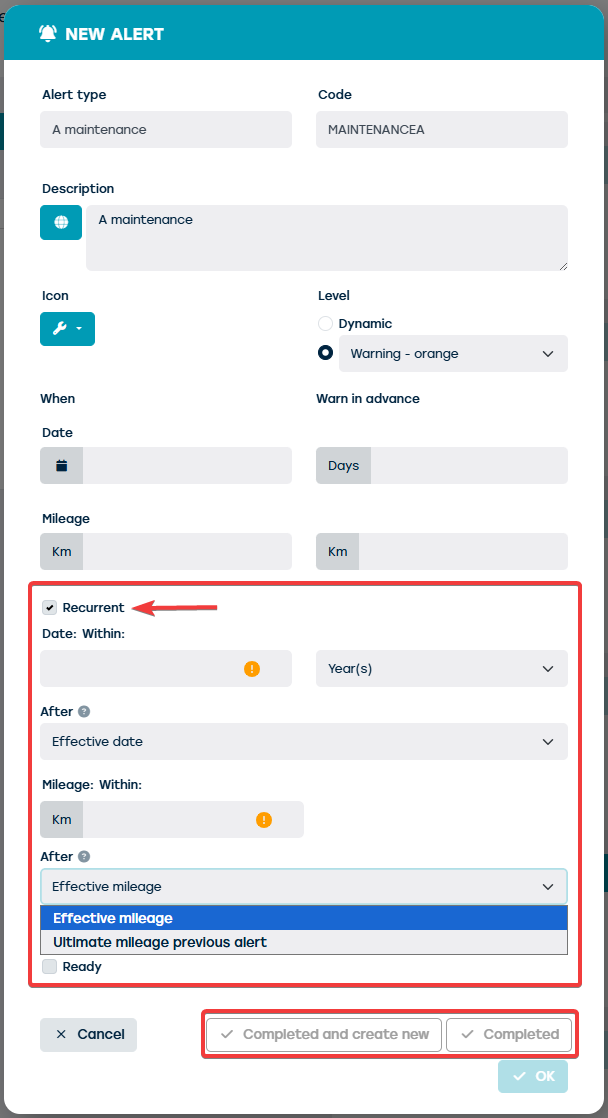
- When selecting the 'recurring' checkbox, the fields for setting the recurrence will appear
- The recurrence can depend on:
- The actual date or mileage: this is the actual date or mileage at which the alert will be completed.
- The deadline date or mileage of the previous alert: this is the date or mileage at which the current alert should be completed.
- When you click 'completed', you finalize the current alert without creating a new one
- When you click 'completed and create new', you finalize the current alert and the system will create a new alert according to the set recurrence.