If you have many different rates, it is often a challenge to index them. After all, this means you have to adjust the price of each of these rates individually. However, ProPlanner offers you a solution to do this quickly and easily.
In the overview of the rates (Management > Prices >Rates), you will find a button labeled "Actions" at the top. Clicking on this will show you, among other options, the option to "Copy rates to a new rate period". This option will only be active if at least 1 rate has been selected.
To index certain rates, proceed as follows:
- Select the rates to be indexed
- Then click the "Actions" button and select the option "Copy rates to a new rate period". This will take you to the following screen:
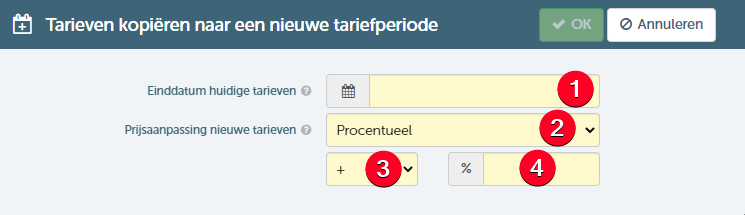
- In the above screen:
- Enter the date of the last day on which the current rates are valid.
- Specify whether the price adjustment should be done percentage-wise or absolutely .
- Determine whether it is a price increase (+) or decrease (-).
- Specify the percentage of the percentage price adjustment (or the amount of the absolute price adjustment).
- When you then click on OK :
- Will the selected rates be adjusted with the specified end date
- Will there be new rates created that are an exact copy of the selected rates, except:
- The start date that will be set with the date of the day after the specified end date
- The unit price that will be adjusted as specified in the above window.
If you want to apply an absolute price decrease to the selected rates, it is possible that this price decrease would result in a negative amount for some rates. ProPlanner will check this and in these cases, the new price will be set to € 0.00 to exclude negative rates.