In Belgium and the Netherlands, addresses will now be automatically filled in or suggested when certain address characteristics are provided. ProPlanner predicts the possible address based on this information:
- Netherlands: For optimal results, it is recommended to first enter the postal code and house number. With this data, the complete address can be reconstructed.
- Belgium: Currently, there is no specific recommended method available. However, in Belgium the address is supplemented based on suggestions.
For example: entering a postal code displays all streets in that area, and this list is further refined with each additional inputted letter of the street name.
Once certain characteristics have been entered, ProPlanner displays a dropdown menu when it can provide a suggestion. If a suggested option is incorrect, it can be manually overridden.
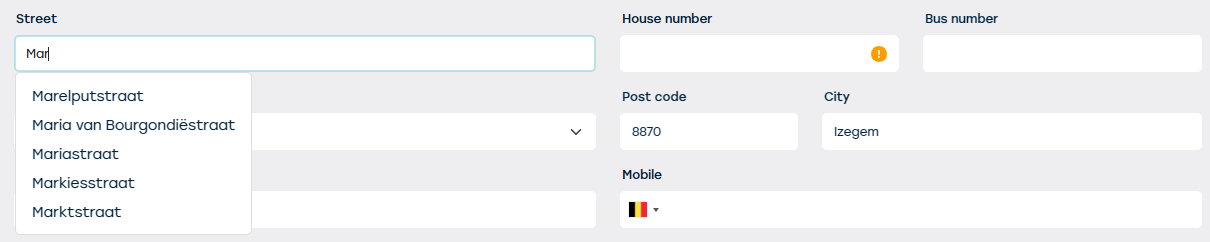
After entering the address completely, ProPlanner automatically performs a verification. If the address is not known in Belgium or the Netherlands, for example due to an incorrect spelling, a warning is displayed.

Note: This warning is purely informative and does not have any blocking effect.
Automating (part of) the filling in of addresses not only increases efficiency, but also significantly reduces the risk of manual errors.
Note:
- To be able to use the suggestions, it is essential that the country is always filled in.
- In bilingual cities and municipalities, the suggestions will be displayed in both languages.
- This functionality is enabled by default in every environment and applies to all input screens for addresses. If you do not want to use this feature, please contact our support service.