Yes, you can. To do this, go to the customer overview (Manage > Customers > Customers) and select the desired customer. When you open the detail screen of this customer, you can view their payment status via the "Invoices" tile:
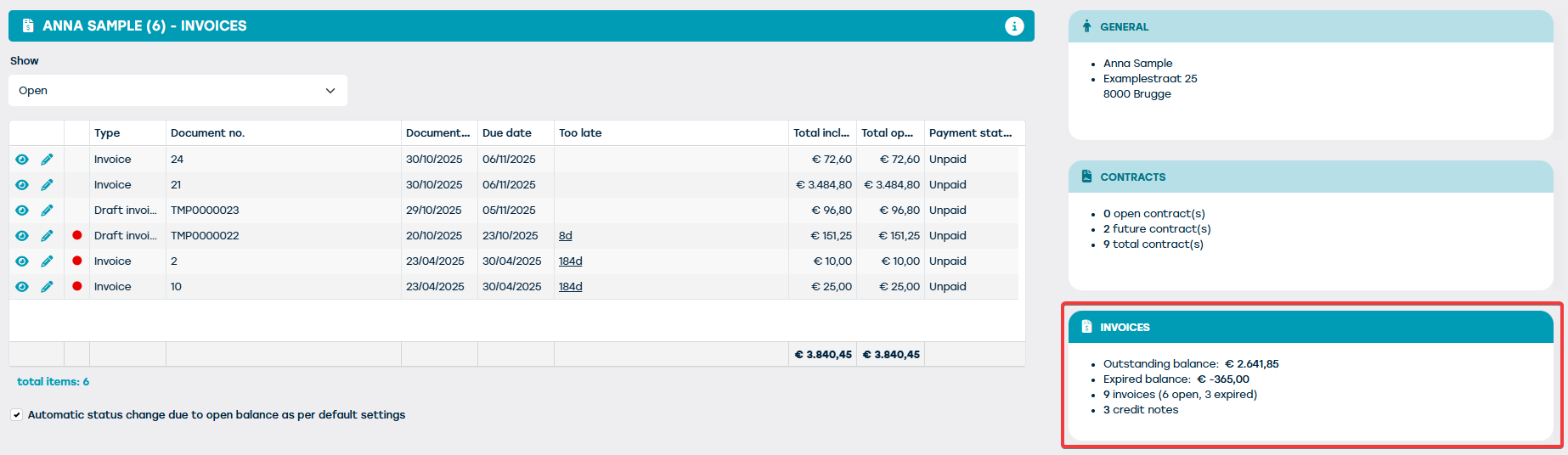
The mini-tile "Invoices" on the right side of the screen provides a clear overview of this customer's payment status. You will find the following information there:
- Outstanding balance - this is the sum of the balances of all the outstanding invoices for this customer
- Overdue balance - this is the sum of the balances of all the outstanding invoices for this customer for which the due date has already passed
- Total number of invoices for this customer, indicating the number of outstanding and overdue invoices.
- Total number of credit notes for this customer, again indicating the number of outstanding and overdue credit notes
The detail on the left side of the screen then displays more information about the invoices and/or credit notes for the respective customer. By default, only the outstanding invoices and credit notes will be shown on this screen, but you can choose to:
- See everything (both paid and unpaid invoices and credit notes)
- See only the paid invoices / credit notes
- See only the outstanding invoices / credit notes
- See only the overdue invoices / credit notes (i.e. outstanding whose due date has already passed)