During the term of a contract, emails are automatically sent to the customer and/or driver on the contract at various times. These times include:
- Sending the quote (if you use the Quotes module)
- Sending the contract
- Confirmation of the reservation (depending on the settings for the rental type)
- Reminder of a reservation that is about to start (depending on the settings for the rental type)
- Upon departure
- Upon arrival
- Upon invoicing
By default, these emails are sent to the driver on the contract, with the customer copied in. An exception to this is invoicing: this email is only sent to the customer.
Flexible recipients via tags
To send confirmation emails after contract signing and online payment, you can use a flexible tag system in the email settings. This system replaces the fixed dropdown and allows you to define multiple recipients.
Go to General settings > Email and set:
- Send confirmation email upon contract signing to
- Send confirmation email after online payment to
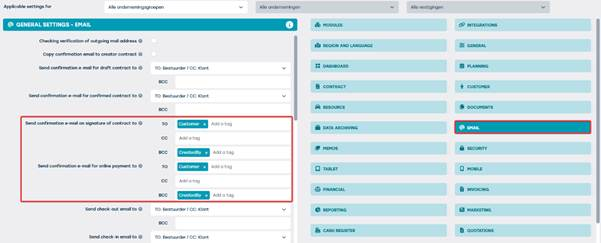
Here you can use tags such as:
- Customer – the customer
- Driver – the driver
- CreatedBy – the user who created the contract
- Creator – the creator of the contract
You can also manually add email addresses, separated by commas.
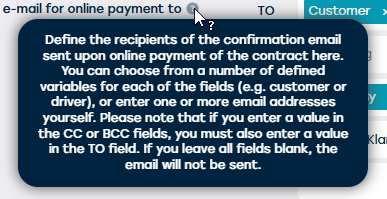
Tooltips in the settings provide additional information about the use of tags:
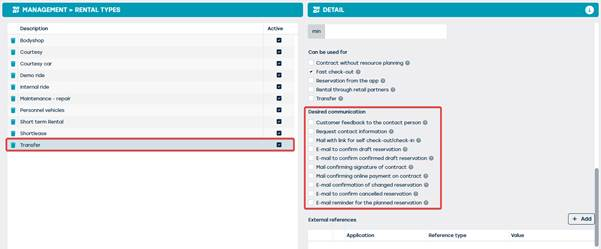
Important: communication checkboxes for rental type
To send these emails effectively, you must check the appropriate options under “Preferred communication” for the rental type. Without these checkboxes, the emails will not be sent:
Custom adjustments
Would you like to deviate from the default settings, for example, by placing a different email address in BCC for certain emails? Please feel free to contact us at support@jumik.be.