Don't lose track of contracts without a resource anymore!
Contracts without resources have been possible in ProPlanner for some time now. A contract without resources can be created when creating or performing an action that removes the resource from the contract, resulting in a 'contract without resources'.
These contracts can be made visually visible on the schedule under the 'contracts without resources' strip.
However, there is a risk that these contracts will not be rescheduled in a timely manner. This requires a vigilant eye and manual rescheduling. ProPlanner provides automatic rescheduling of contracts without resources based on availability in the schedule.
A contract without resources occurs in the following situations:
- When creating a contract: Contracts are manually created without a resource
- When moving contracts in bulk: Contracts are moved in bulk (via the action 'move future contracts'), which removes the linked resource for these contracts and makes them contracts without a resource
- When switching contracts: Contract with resource A is moved to resource B. The contract on resource A is then assigned resource B. The contract on resource B no longer has a resource assigned and becomes a contract without a resource.
When ProPlanner is granted the right to automatically reschedule resources, it searches for a similar resource that meets the criteria present in the original contract (e.g., tag, price range, resource type,…)
This process is triggered when adjustments in ProPlanner result in additional availability within the pool, these include:
- Actions described above where a contract is created without a resource
- Adjusting times in the resource planning
- Deleting a resource planning
- Adding a new resource
- Adjusting the 'active from' date on the resource
When one of the above actions is performed, ProPlanner will immediately attempt to replan the contracts without resources.
Once the contract has been replanned on a new resource, it will be displayed on the contract as follows:
- When you hover over the contract on the schedule:

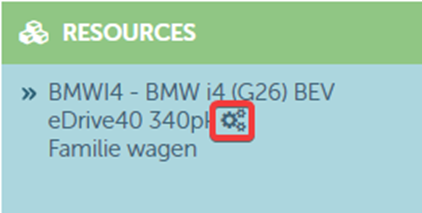
- In the contract on the resource tile:
- On the microtile schedule in the contract using the following dropdown:
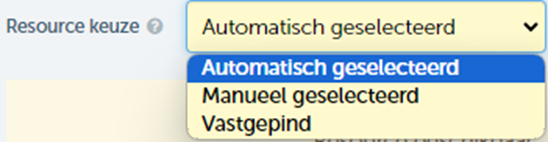
- When the resource planning has been automatically rescheduled, the dropdown will display 'automatically selected'. This schedule was not specifically chosen by a user and can therefore be changed without any issues
- When the resource 'manually selected' is, it will have been specifically chosen by a user. The resource can be changed as it was not pinned
- If the third option 'pinned' was chosen, a user indicated that the resource should not be modified under any circumstances on the resource schedule.
Note:
- When automatic scheduling for a contract does not find a matching resource, no resource is assigned and this remains a resource-less contract. Every night, the schedule is reviewed and, if possible, the contract is assigned to a resource.
- Replanning will never occur on a resource where the contract was originally assigned.
- Please contact us to activate automatic replanning on your ProPlanner environment.
- Please allow for a waiting time when automatically replanning of the contracts. Due to performance priorities, it may take some time before the contract is assigned to the resource.