By default, ProPlanner uses a fixed list of resource definitions. In addition, a number of resource types will also be assigned to these definitions by default. You can expand and modify this list of resource types at will. You do this through the resource type management screen, which can be accessed via Manage > Pool - parameters > Resource types:
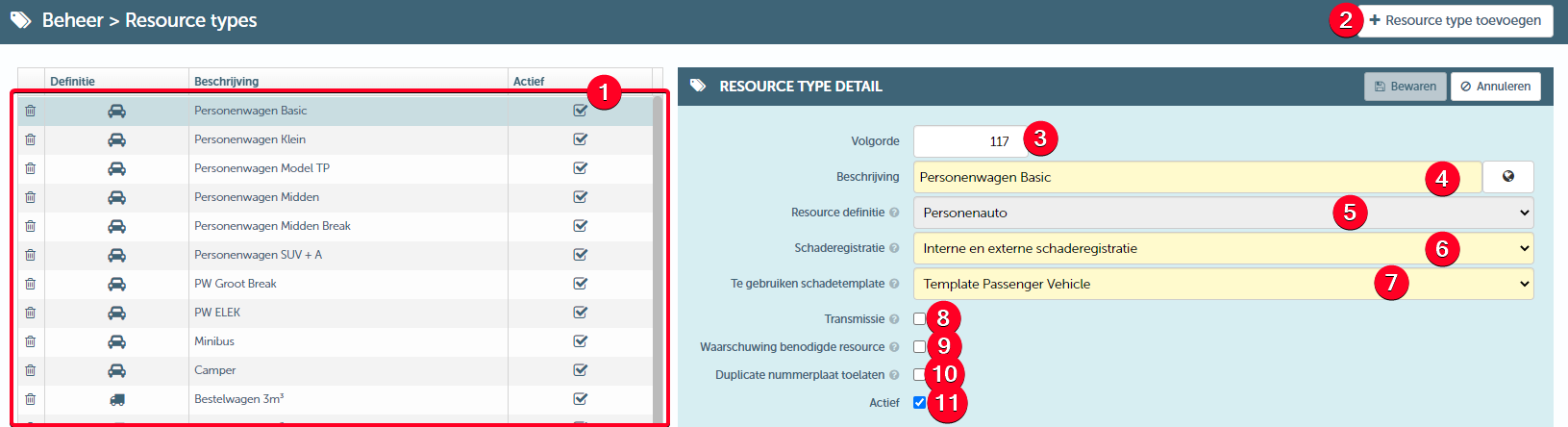
In this screen, you can:
- Select an existing resource type (1) and customise it
- Add a new resource type (2)
- When customising or creating a resource type, you can/should specify the following information:
- Order (3) - Determines the order in which the relevant resource type appears in the drop-down list when creating a new resource
- Description (4) - Here you define the name of the relevant resource type. The globe allows you to specify the translation for this name for all languages supported by ProPlanner.
- Resource definition (5) - You can only change this when creating a resource type. For existing resource types, you can no longer change this.
- Damage registration (7) - Determine here whether internal and/or external damage recording is required for a resource of this type.
- Damage template to be used (8) - Determine the default damage template to be used for a resource of this type here. At individual resource level, this can still be adjusted.
- Transmission (9) - Here you can specify whether a resource of this type uses a transmission
- Required resource warning (10) - If you check this checkbox, a warning will be shown on the contract if a resource of this type needs to be added.
- Allow duplicate licence plates (11) - This checkbox is only shown if the selected resource definition in (5) can contain a licence plate. This checkbox determines whether multiple resources of this type can have the same licence plate. For instance, this allows you to specify that a bicycle from a particular branch within the company group can have the same identification plate as another bicycle from another branch within the same company group.
- Active (12) - Indicates whether the resource type may still be used actively.