A periodic maintenance check causes a temporary unavailability of the resource
Such situation may occur for a resource on an ongoing contract. The resource temporarily becomes unavailable, which results in providing a replacement vehicle for the customer.
The original resource needs to be (temporarily) replaced by a new resource.
It is recommended to:
Instead of:
|
This way of working ensures a faster handling and also offers the possibility to provide the replacement resource free of charge (as the contract with the original resource continues to run).
If you opt for this, only the driven kilometers with the new (replacement) resource need to be taken into account. For this purpose, these kilometers must be transferred to the original (main) contract.
The sum of the kilometers on the original contract and the new contract(s) are then compared to the included number of kilometers provided on the original contract. When exceeding, you have the possibility to charge these extra kilometers to the final invoice of the original contract.
In order to transfer the kilometers, the underlying contract (the replacement car) must be linked to the main contract (the original car). Whether linking contracts is possible or not, you can determine it on the rental type.
- Go to management (contracts) - rental types for this.
- Next, the option 'transfer driven kilometers to another contract' can be checked. Once checked, it will be possible to transfer the kilometers from the underlying contract with this rental type to the chosen main contract

When creating the underlying (replacement) contract, when choosing the rental type, an additional dropdown 'main contract' will appear on the tile reservation (if you checked the above option)
This dropdown will display all contracts that meet the following conditions:
- All contracts on the same main customer
- Those that are not underlying contracts (only main contracts are shown)
- Whose time period matches or is longer than the underlying contract
- And which have not been checked in yet (the contract is still ongoing)
Then select the desired main contract

When the car is checked in under the underlying contract, the number of kilometers driven with the replaced car will be entered. These must be transferred to the main contract.
When opening the main contract, ProPlanner checks if any underlying contracts have been linked to this contract. If applicable, the kilometers of the linked contract(s) will be transferred:
- Open the microtile 'intermediate mileage' on the main contract's tile resource

- An additional line appears 'additional driven km' (1), which will display the total number of kilometers driven from the linked underlying contracts
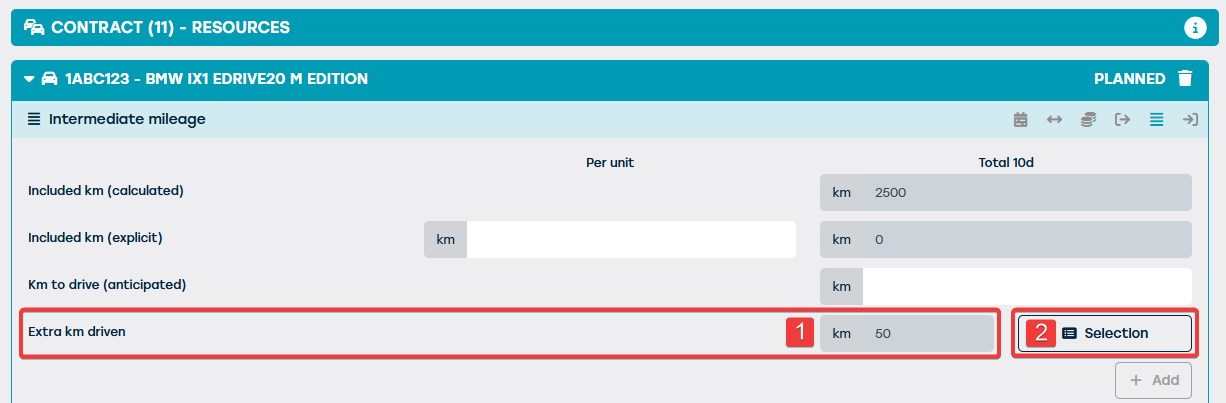
- Then you can determine based on which contracts this total came about and you are able to exclude certain contracts. You can call up this overview via 'selection (2)
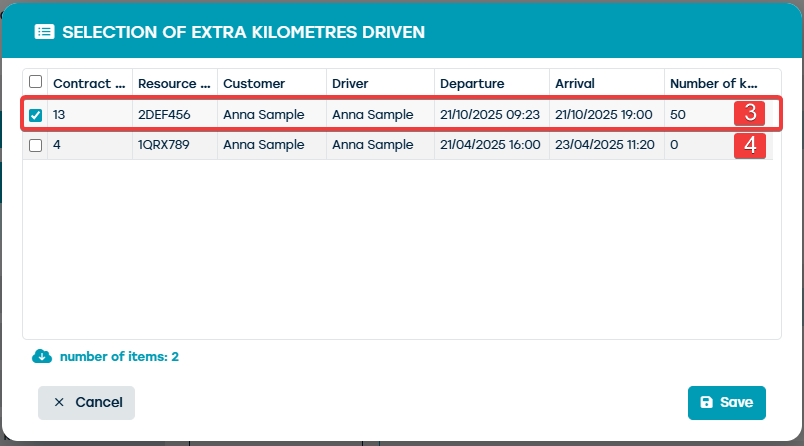
- The blue checked contracts (1) are the underlying contracts that were linked to this main contract according to the described method above. You have the choice to transfer these kilometers or not to this main contract.
Furthermore, this overview will also display all underlying non-linked contracts with the following conditions (2):
- Contracts with the same customer
- Where the duration of the underlying contract falls within that of the main contract
- And has not yet been linked to another main contract
If a contract was not linked but still needs to be included, you can check the desired contracts in the selection menu, the sum of the number of kilometers driven for this selection will be transferred to the main contract.
During the final billing of the main contract, the added extra kilometers from the underlying contracts will be taken into account in the total number of kilometers driven, and therefore included in the calculation of the additional kilometers to be charged.