The tile "Collections" on the contract screen will only be visible if the module "Collections" has been enabled. To activate this module, you can contact us at support@jumik.be.
After activating the "Collections" module, additional rights will be granted which will allow you to give the desired roles the right to manage transactions. Until these rights have been assigned to any role, no one will be able to register transactions on a contract and consequently, no one will have access to the "Collections" tile on the contract. You can assign the rights via 'Manage' > 'Users and Rights'.

When the "Collections" module has been activated and when you have the correct rights, you will see an extra tile "Collections" in the details screen of a contract. This tile offers you the following options:
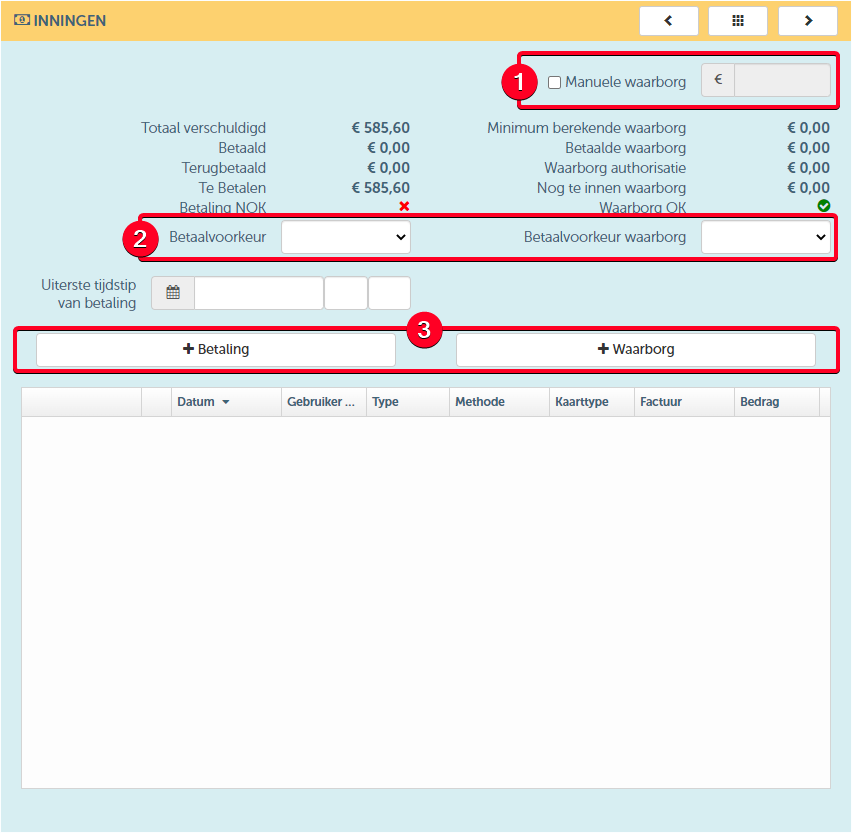
- You can set a manual deposit on the contract. This will override the automatically calculated deposit based on the resource, if any. This manual deposit will never be overwritten by ProPlanner.
- You can determine the payment preference for both the deposit and the invoice amount:
- For the payment preference of the invoice amount , you have options to choose from. These options are informative for contracts created within ProPlanner itself, but they are decisive for contracts created by the customer through an external application (such as the web plugin). The possible options are:
- For reservation - in this case, the payment will be requested at the time the reservation is made.
- At check-out - in this case, payment will be requested when the customer leaves with the vehicle.
- At check-in - in this case, payment will be requested when the customer returns the vehicle.
- On invoice - in this case, payment will be requested via an invoice that will be sent to the customer after the contract ends.
- Also, for the warranty payment preference , you have various options. Also here, they are informative for contracts created within ProPlanner itself, but decisive for contracts created by the client via an external application. The possible options are:
- On Reservation - in this case, the payment will be requested at the time the reservation is made.
- At check-out - in this case, the payment will be requested at the moment the customer departs with the vehicle.
- Exempt from deposit - in this case, the customer does not have to pay a deposit
- For the payment preference of the invoice amount , you have options to choose from. These options are informative for contracts created within ProPlanner itself, but they are decisive for contracts created by the customer through an external application (such as the web plugin). The possible options are:
- You can register a payment or a deposit-related transaction on the contract. By registering a transaction on the contract, the outstanding balance will be automatically adjusted. In this way, you have a clear view of the payment status of the respective contract. If you would like more information about recording transactions on the contract, you can visit here .