The integration with Exact Online includes a complete synchronization. This means that ProPlanner will retrieve information from Exact Online, but also that ProPlanner will send information to Exact Online.
This comprehensive integration includes the following functionalities:
| From Exact Online to ProPlanner | From ProPlanner to Exact Online | |
|---|---|---|
| Customers | X | X |
| Cost centers | X | X |
| Expense carriers | X | X |
| General ledger accounts | X | |
| Invoices / Credit notes | X | |
| PDF of invoices / credit notes | X | |
| Transactions | X |
These functionalities can be enabled or disabled individually via settings. To adjust these settings, you can contact us at support@proplanner.eu. Together we can then adjust these settings so that the integration with Exact Online is completely customized to your specific needs.
Customers
If the integration with Exact Online is set up in such a way that it is possible to search for customers in Exact Online, you will have the option to search for them in Exact Online when adding a new customer (both business and private customers).
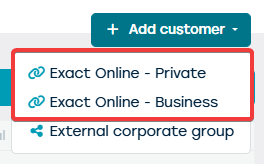
Through these options, you can search for the desired customer in Exact Online and then import them into ProPlanner. Depending on the choice made, this customer will be created as either a private or business customer. In this case, it will be checked whether the customer is not already known within ProPlanner. If this is the case, the existing customer in ProPlanner will be opened.
In addition to looking up a customer in Exact Online, the possibility remains to manually create a customer in ProPlanner. You can indicate through a setting when this customer should be forwarded to Exact Online:
- When saving the customer - this means that every customer in ProPlanner will be sent to Exact Online, so also the customers that will never be invoiced.
- When forwarding an invoice to the customer - in this case, only those customers who will be sent to Exact Online who will be invoiced.
Cost centers and cost carriers
The use of cost centers and/or cost carriers can be enabled or disabled within ProPlanner. If you wish to use this, please contact us at support@jumik.be.
If cost centers and / or cost carriers are used, you can choose to:
- Create the cost carriers / cost centers in ProPlanner, which will then be sent to Exact Online. Here you still have the option for ProPlanner to automatically create them based on the created resources.
- Search for the cost carriers / cost centers in Exact Online, which can then be imported into ProPlanner. Here too, a check will be performed to verify if the cost carrier / cost center to be imported does not already exist in ProPlanner.
In addition to the settings that determine how the cost carrier / cost centers are created in ProPlanner, there are also settings that determine whether the cost carrier / cost centers should be included when posting an invoice to Exact Online.
General ledger accounts
You can determine how a general ledger account should be created in ProPlanner via a setting:
- You can choose to create the general ledger accounts directly in ProPlanner. It is important to note that these will never be automatically forwarded to Exact Online. Therefore, these general ledger accounts will have to be manually created in Exact Online.
- You can also choose to mandatory search for the general ledger accounts in Exact Online. In this case, a general ledger account must first be created in Exact Online before it can be imported into ProPlanner. Also here under no circumstances will an update be sent to Exact Online. If the general ledger account is modified in ProPlanner, these changes will not be communicated to Exact Online.
ProPlanner will never create or modify general ledger accounts in Exact Online.
Invoices and credit notes
Regarding the forwarding of invoices / credit notes to Exact Online, you can choose to have this done automatically, with synchronization taking place overnight, or manually, where you determine when to forward which invoices to Exact Online.
At the moment, there is no feedback from Exact Online to ProPlanner regarding the payment of these invoices. However, this is being worked on.
You can choose whether the PDF document of the invoice should be sent along with the booking to Exact Online through a setting. If you choose this option, you will be able to view the corresponding invoice in both ProPlanner and Exact Online after synchronization.
Transactions
If you choose to use this functionality, the transactions recorded in ProPlanner will be regularly forwarded to Exact Online. However, in order for this to work correctly, some important settings need to be configured at the branch level.
- The code of the diary to be addressed for booking cash transactions.
- The code of the diary to be used for various transactions (i.e. non-cash transactions). non-cash transactions).
- The description you wish to attach to the transactions when they are sent to Exact Online.
- The general ledger account to be used for customers.
- The general ledger accounts to be used for the different types of transactions.