When a customer has committed an offense with one of the vehicles in your fleet, you, as the registrant of the license plate, will receive the fine. This is usually the starting point of a time-consuming administrative process where you have to find the driver who was driving the vehicle at the time, after which you can transfer the fine or invoice it to the driver or customer in question. ProPlanner can completely relieve you of this thanks to our own ProPlanner Fine Management!
The entire fine administration is automatically processed thanks to ProPlanner Fine Management, Email forward the fine and ProPlanner Fine Management does the rest! This way, you can continue to focus on what really matters.
No matter what fine, ProPlanner Fine Management processes them for you:
- Speeding violations
- Parking and GAS fines
- Foreign traffic violations
An integration with ProPlanner Fine Management allows you to indicate how a fine for each individual client should be processed. You can choose to process the fine in the following way:
- To be shifted: In this case, the data of the respective customer will be forwarded to the relevant authorities in the event of a penalty so that they can send the penalty to the customer in question.
- To be charged: In this case, you decide to pay the penalty yourself, after which it will be invoiced to the respective customer.
In addition, you can choose to charge an administrative fee in both cases, the amount of which can be defined for each individual customer.
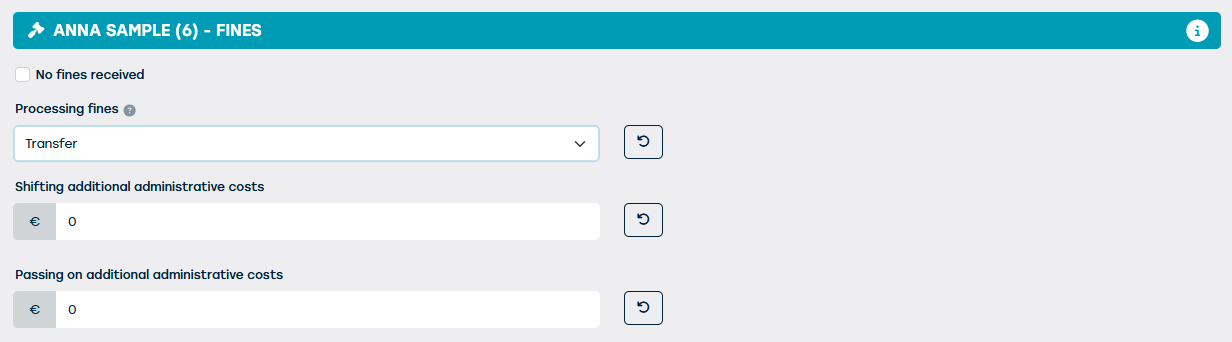
When configuring the penalty processing, the standard way of working and the standard administrative cost to be charged must be agreed upon. If you wish to change this later on, please contact us at support@proplanner.eu.
How do we process your fines?
When you have received a fine, simply email it in pdf format to <klantnaam>@proplannerfines.eu. The rest of the penalty processing is in our hands. Once we have received the fine, we process it and try to match it with the corresponding contract in ProPlanner.
Once this match is made, we will take the necessary steps to handle this fine according to the settings in ProPlanner for the respective client:
- If the fine needs to be transferred, we will forward the details of the respective client to the competent authorities. They will then send the fine to this client, so that they can pay the fine themselves. For any administrative costs, an invoice will be automatically generated in ProPlanner, which will then be sent to this client depending on the settings on the client (possibly using a customized template). A copy of the fine will be included in the email with the invoice.
- If the fine needs to be charged, this means that you will pay the fine instead of the customer. With the data we can find in ProPlanner, an invoice will be automatically created for the amount of the fine plus any administrative cost. Also, this invoice will be sent automatically to this customer depending on the settings on the customer (you may use a custom template). A copy of the fine will be included in the email with the invoice.
If a fine is forwarded where we cannot find a matching contract in ProPlanner or where information is missing in the contract, an action will be created for this in the Home screen of ProPlanner for the person responsible for fine processing. This person can then immediately open the corresponding screen and enter the missing data via a link. As soon as the action is approved, we will take over again to do the matching and further handle the fine.