If you have the 'ProPlanner Fine Management' module, you can have us set up a standard type of penalty processing (chargeback/reverse charge) or a standard administrative cost for both business and private clients at no extra cost. Please contact us for this.
This general setting will be applied by default to all clients. However, if you want to deviate from this, you can enter a separate administrative cost at the customer level in the case of reverse charge or pass-through. To do this, open the "fines" tile in the customer overview.
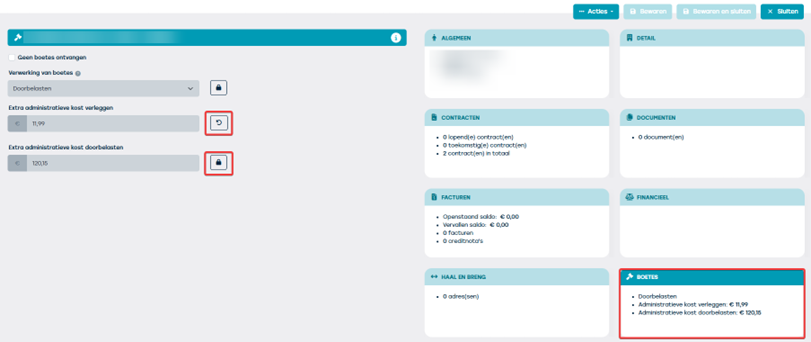
The settings that include a lock are the general settings configured by ProPlanner.
If you want to deviate from this, you will have to click on the lock, enter a different value and save this setting at the top right of the screen. The specific client-level settings (seen via the arrow) will always be preserved.
Note: when the 'redirect' setting is overridden due to legislation or rules of the authority and therefore the fine must be passed on or vice versa, the administrative cost of passing on the fine will automatically be taken over as well.