We notice that deposits and advance payments are often used interchangeably, even though there is a fundamental difference between the two:
| Deposit | A deposit is something that is given as temporary collateral in case a certain obligation cannot be fulfilled. In most cases, it is an amount of money that is given as collateral in case the rented vehicle is returned damaged, or if certain items are missing when the vehicle is returned. When it appears upon return of the vehicle that everything is in order, this deposit will be returned. |
| Advance payment | An advance payment is an amount that is paid in advance. This is usually used to reduce the risk of a customer not showing up. The advance payment will not be returned to the customer, but will be deducted from the final invoice. In other words, the advance payment is a part of the total amount to be paid that is already paid in advance by the customer. |
| Deposit that is subsequently processed as an advance payment | At the beginning of the contract, a deposit will be requested as collateral for the rented equipment. When it is determined at the end of the contract that the deposit should be returned, it will be settled against the final invoice, so that it is processed as an advance payment that has already been paid. |
Processing an advance payment in ProPlanner
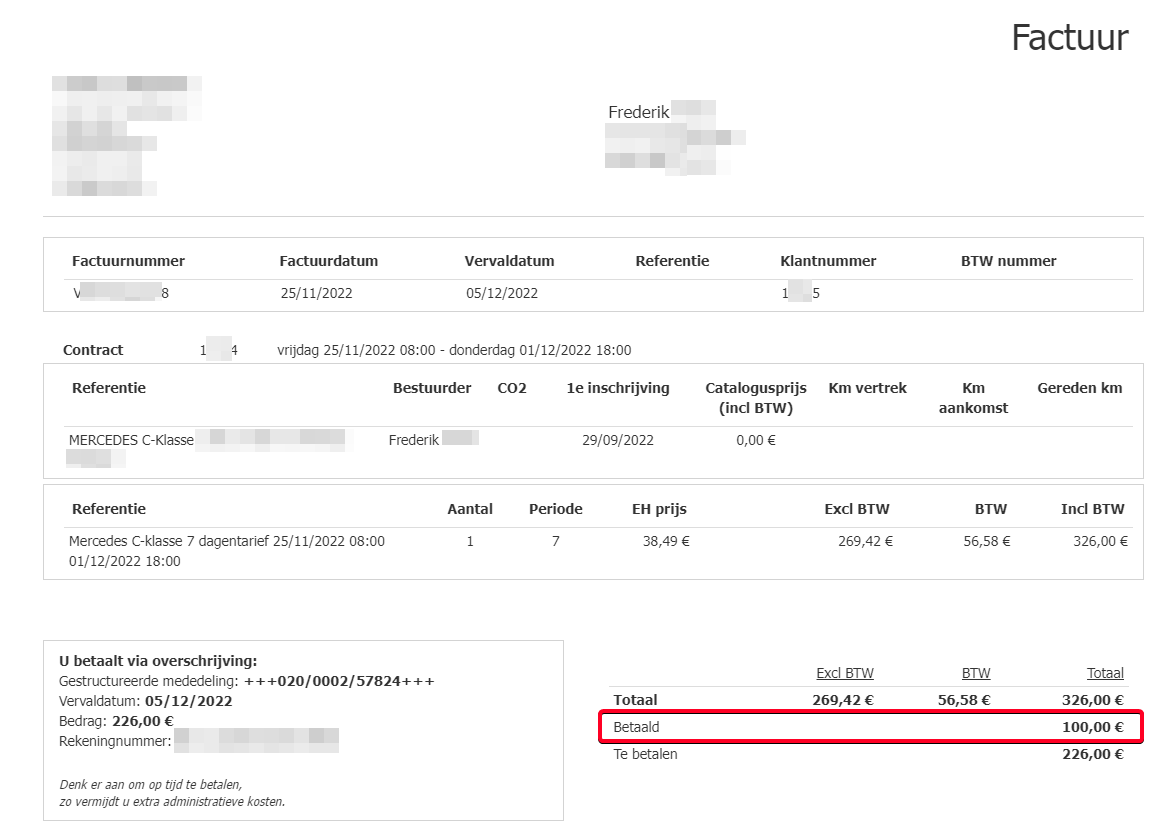
When the customer pays an advance, it must be recorded as a payment in ProPlanner. This advance payment is then deducted from the total amount still to be paid and will also be shown on the final invoice as an amount already paid:
Processing a deposit in ProPlanner
To fulfill the deposit on a contract, there are two possible solutions within ProPlanner:
The setting "Settle deposit on payment of final invoice" determines how the deposit will be refunded:
- If the setting is enabled, the paid deposit will be deducted from the final invoice and thus processed as an already paid advance payment.
- If the setting is disabled, the deposit that was paid must be refunded. This will not be settled as an advance payment on the final invoice.

Contact us at support@proplanner.eu to set this up as desired.
- The deposit will NOT be settled on the final invoice afterwards:
- When paying the deposit, it must be recorded as a deposit-related transaction of the type "Deposit collection". At that moment, the "Deposit payable" will be reduced by the paid amount.
- However, when the deposit amount is reserved, a deposit-related transaction must be booked of the type "Deposit credit card authorization". Again, at that moment, the "Deposit payable" will be reduced by the reserved amount.
- When after the end of the contract it turns out that the deposit must be refunded to the customer, there are two possibilities:
- The deposit has been paid - The paid deposit must be refunded through a deposit-related transaction of the type "Deposit refund".
- The deposit has been reserved - In this case, no further action is needed.
- The deposit is settled afterwards on the final invoice:
- When paying or reserving the deposit, you must proceed entirely as described above.
- When the deposit must be refunded to the customer, nothing needs to be done. This will be automatically settled on the final invoice as an amount already paid (of course, only in case of an effective payment of the deposit).