Insurance policies are essential for car rentals and dealerships, not only for protection against Damage, but also as an effective upselling strategy. Offering an additional Insurance that lowers the excess can offer Customers more security and reduce the financial burden in case of Damage.
Defining an Insurance involves several steps:
- Determine the Excesses/excess/franchise
- Determine the insurance profiles with corresponding Options
- If desired, provide the necessary redemption amounts for one or more Excesses
- Finally, we parameterize a few settings that are closely related to Insurance policies
1. Exemptions
An excess, also known as deductible or franchise, is the amount the insured must pay before the Insurance covers the rest of the Damage. This arrangement is intended to share the risk between the insured and the insurer.
For example, if there is an excess of €500 for glass breakage and there is Damage to the car costing €2000 to repair, the insured pays the first €500 and the Insurance covers the remaining €1500. This arrangement encourages insured parties to be more careful, as they bear part of the costs themselves in case of Damage.
I want to create or edit Exemptions
2. Insurance profiles
Once the Exemptions are established, they are organized into various Insurance profiles, each aimed at a specific Vehicle Type such as a car, bicycle, or van. Each of these profiles includes a different set of Exemptions, tailored to the specific risks and usage characteristics of that Vehicle Type.
Within each insurance profile you have the freedom to decide how many Options you offer. These Options offer the possibility to adjust the excess to the preferences and needs of the User. For example, an Option can offer a reduced excess that decreases the deductible in exchange for a higher insurance premium, while on the other hand, you can choose to increase the franchise, which can be attractive for insuring Young drivers.
Each profile requires at least one Option, often regarded as the 'default Option'.
I want to define insurance profiles with corresponding Options
3. Redemption amount
Finally, you have the option to decide whether one or more of the Options under a given insurance profile can be redeemed. As mentioned earlier, lowering the deductible usually results in a higher insurance premium.
I want to determine redemption amounts
4. Configuration to be determined and set after parameterizing the Insurance policies
- Determine price line redemption amount on invoice and contract
Once the redemption amounts are determined, it must be decided how these amounts will appear on the contract and invoice. Some choices must be made:- Inclusion of the default Option in the rental price: If the default Option is part of the rental price, you must decide whether you want to display a price line on the contract or the invoice. This price line would then contain a zero value, but makes it clear to the Customer that Insurance is included in the rental price.
- Display of the price lines: Once you have decided whether to show a zero line for the default Option, you must determine how the price lines for, whether or not the default Option, and other Options will be formatted. Below is a list of all possible variables that can be used to compose this price line, possibly combined with fixed text. For example:
"Rental - Insurance - Reduced excess - 1AAA 111".
Here is an example of an Insurance price line that may or may not be shown with an amount on the contract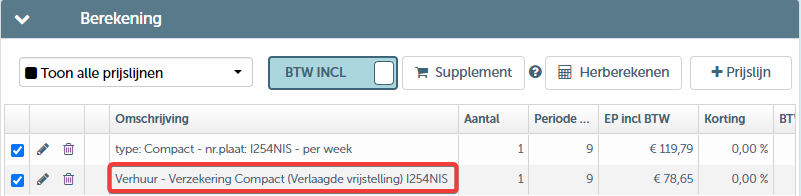
Determine templates
Assign insurance profile to a resource
A resource requires an insurance profile. When creating a resource, it is mandatory to choose an insurance profile.
You do this as follows: Go to Management > Fleet > Resources. Then select a Resource (if you wish to change it) or create a New resource.
On the 'insurance' tile you can define the desired insurance profile.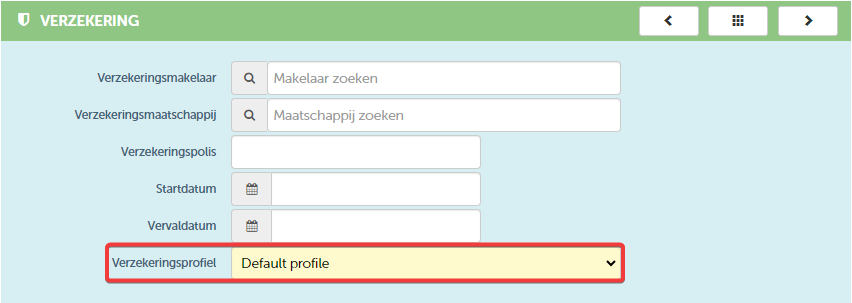 Note that you can still change this profile on the contract if desired
Pin insurance profile on contract

This setting ensures that the insurance profile of a resource is pinned by default on a contract. Once the profile is pinned, it remains so even when the resource itself changes. This provides consistent insurance coverage over time. Note, this setting applies to all resources if you activate it.
However, you can adjust this setting per specific contract. If you wish to change or unpin the insurance profile, you do this on the 'resource tile' of the contract. You can tick or untick the box to indicate whether the Insurance remains pinned for that contract.
 If you want to use this, let us know, we will activate this feature for you
Change insurance after check out

This setting indicates whether Users have the ability to adjust the insurance conditions after a car has already been checked out.Consequences? Determine insurance on contract
As mentioned earlier, you must assign an insurance profile to each resource; this is mandatory. Once you have determined the terms and conditions of this profile and chosen a default Option, this Option will automatically be suggested when you draw up a contract with this resource. However, you have the option to adjust this Option at any time if you wish.
You can change this in the contract:
Go to a contract and select the 'Resource' tileInsurance required at reservation and/or check out depending on rental type
Default insurance Option
- Insurance for contract in general settings
- Insurance by rental type
- on resource
- Insurance and pricing on contract
| Excess | € 1,000.00 |
| Exterior cleaning | € 30.00 |
| Interior cleaning | € 125.00 |
| Fixed fee for refueling (excl. fuel) | € 50.00 |
| Making the car smoke-free | € 175.00 |
| Late return of the car | € 100.00 |
| Administrative processing cost Damage | € 200.00 |
| Administrative processing cost fines |