An excess in a car rental insurance is the part of the damage or theft that the renter pays before the rental company's insurance covers anything.
Exemptions determine which costs or damage are not covered by the insurance. There are different types of exemptions, such as:
- Glass and tire insurance
- Theft excess
- Comprehensive insurance
- Civil Liability insurance
- Interior damage
- Roof damage
- Key loss
Later we link these exemptions to one or more insurance profiles, which are mainly determined by the category of the resource. Remember to set up specific exemptions for different types, such as bicycles, vans, and so on.
How do you add an excess?
Go to Management < Insurance policies < Exemptions and press "+ Add Excess"
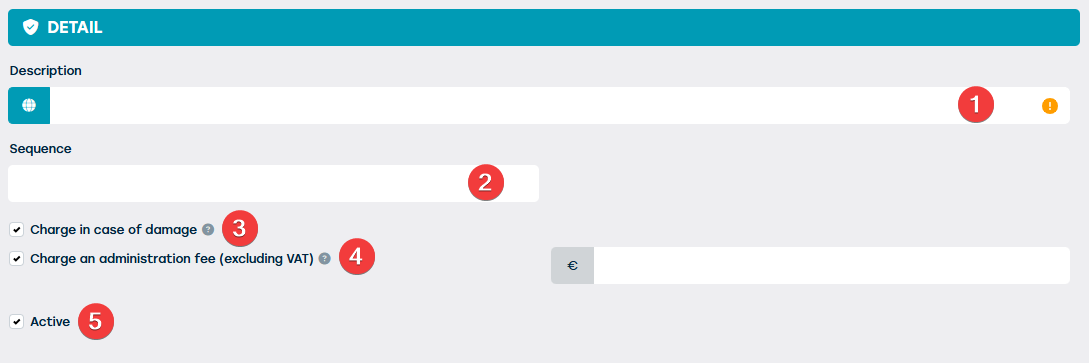
Then enter the following information:
| NR | DESCRIPTION | REQUIRED | REMARK |
| 1 | Enter the name of the excess you wish to create. This will also be visible to the customer on their quotation or contract. | YES | If desired, you can use the globe icon to translate the description |
| 2 | Here you can indicate the order in which the exemptions must be stated on the contract. | NO | |
| 3 | If you select the option 'charge in case of damage', the excess will be charged if damage to the resource is determined during the contract period. | NO | |
| 4 | When you choose the option 'charge in case of damage', the possibility appears to charge an administration fee. This additional fee is in addition to the excess cost, which you can set when defining the insurance profiles, and will be charged when damage is registered during the contract period. You have the possibility to determine the amount of this fee yourself. | NO | |
| 5 | Here you can indicate whether the excess is active. | NO | Used exemptions cannot be deleted, only deactivated. |