Once you have set up one or more insurance profiles, you can define redemption amounts. Each insurance profile contains at least one option, often referred to as the default option. Additionally, you can opt for extra options that, for example, lower the excess, often referred to as the "reduced excess" option. The part of the own risk can often be reduced by paying an additional surcharge. You can parameterize these redemption amounts here.
First, you must determine whether the rental price already includes the standard insurance. Often, no additional cost is charged for the default option.
If you still wish to charge additional costs, you can set a redemption amount for this. Usually, a redemption amount is set when you have a reduced excess option. Below, we explain how you can configure this.
Go to Management > insurance > insuranceprofile redemption tariffs and press "+ add"
Note that the prices you will enter below can be either including or excluding VAT. With the slider (1) you can clearly see whether the prices you set are including or excluding VAT.

The following screen appears
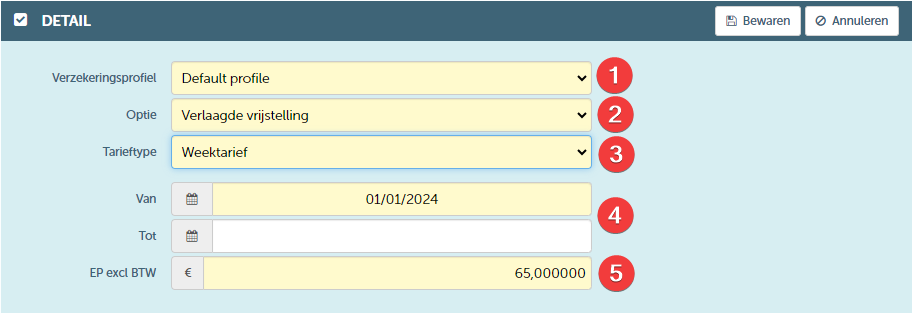
| NR | DESCRIPTION | REQUIRED | Remark |
| 1 | Select the desired insurance profile | YES | |
| 2 | Then select the option for which you wish to determine a redemption amount | YES | |
| 3 | You can set a specific amount for each rate type. We recommend setting an amount for each rate type, so that for all possible contract durations you always have a redemption amount foreseen. This ensures that you are well prepared for every contract duration. | YES | It is essential to understand how the rate types are structured, as a rate type can differ in unit. For example, a weekly rate can be calculated per day by multiplying the daily price by seven (7x daily price) or it can be a fixed price for the entire week (1x weekly price). It is therefore important to know which unit is used when setting a rate. If you work with a fixed weekly price, you simply specify one price for the entire week. However, if you calculate a weekly rate based on the daily price, you must set the correct daily price. This daily price is then multiplied by the number of days. Pay close attention here; if you accidentally enter a weekly price instead of a daily price, it could be incorrectly multiplied by the number of days, which would result in an incorrect calculation. |
| 4 | Determine the start period of this redemption amount. If desired, an end date can also be set | YES | |
| 5 | Lastly, enter the unit price | YES | Pay close attention to whether you are entering prices including or excluding VAT. |
It is important to define all possible rate types needed for a particular option, so that you can cover the entire duration of a contract. By defining all rate types in advance, such as daily rates, weekly rates, monthly rates, or even annual rates, you ensure that an appropriate rate is available for every period within the contract duration. This helps to ensure consistency in invoicing and guarantees that you are prepared for every contract period.