Via the management screen for cash registers you can create and manage a cash register. Here, it is possible to register transactions on a specific cash register. To do this, open the respective cash register and click on the tile "Transactions".
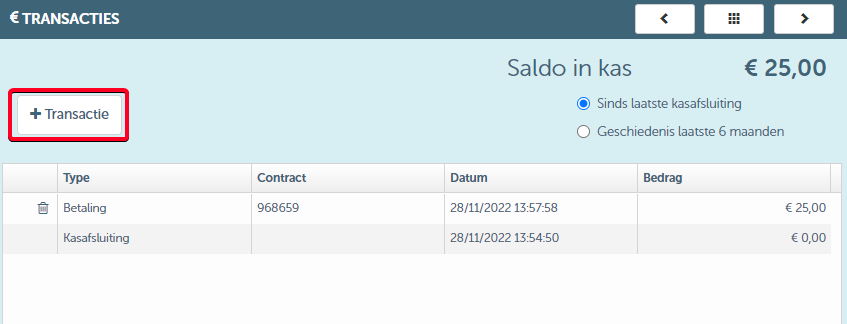
When you click the "Add" button, you will enter the dialog window where you can enter the details of the transaction. This dialog window looks as follows:
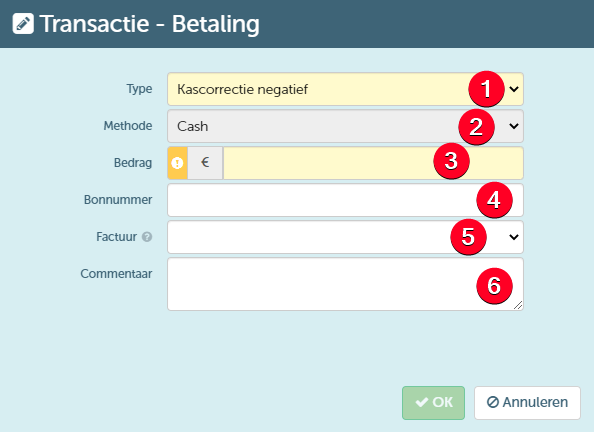
Via this screen, you can:
- Select the type of the transaction . Here, depending on the rights you have, you can choose from the following types:
- Cash correction positive - a transaction to correct the cash total in the positive direction (depositing cash)
- Cash transfer IN - inflow of cash from another cash register
- Cash transfer OUT - outflow of cash to another cash register
- Cash correction negative - a transaction to correct the cash total in the negative direction (removal of cash)
- Cash bank transfer - depositing cash from the cash register into a bank account
- Select the method by which the transaction is executed. Since these are cash register transactions, you can only select the method "Cash" here.
- Enter the amount of the transaction.
- Add a voucher number to which the transaction can be linked.
- Add an invoice number to which the transaction can be linked.
- Optionally add comment to the transaction.