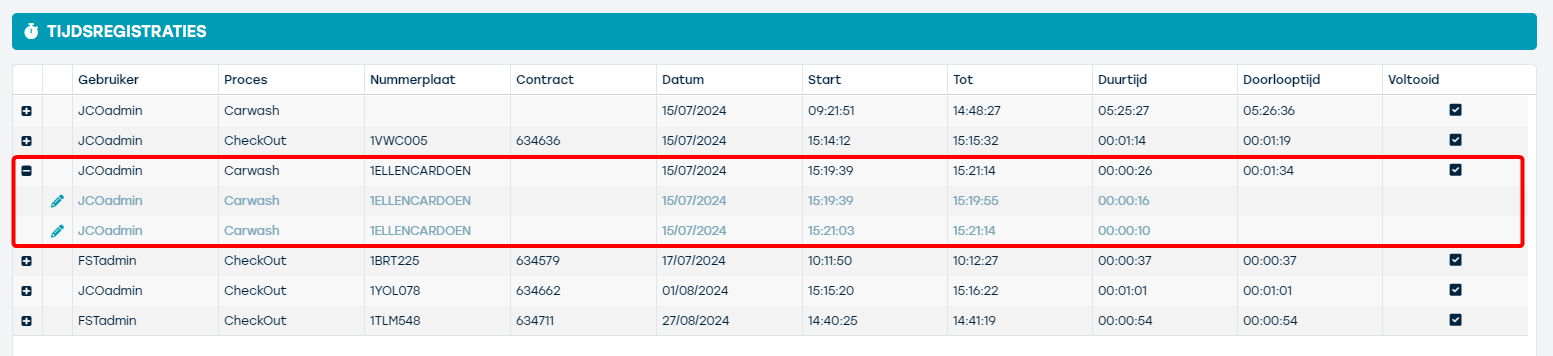
Through this report, you can check how much time the user needed to perform a (depending on the settings) check-out, check-in or carwash that was carried out within the reporting period, which by default is set to the past 7 days. Each line shows how long the user worked on the respective check-out / check-in / carwash. The line can be expanded to view the underlying time records for the specific action (excluding breaks) and to adjust them if necessary (via the pencil icon).
Using the filter bar on the left side of the screen, you can:
- Adjust the reporting period
- Indicate for which process(es) you want to see the time records. Here you can only select those processes for which the time record has been activated. If you do not see the desired process in this list, please contact us via support@proplanner.eu.
- Indicate for which specific resource you want to consult the time records on the respective processes
- Indicate for which specific contract you want to consult the time records on the respective processes
- Indicate for which specific user you want to consult the time records on the respective processes
The report shows the following information:
| FIELD NAME | CONTENT |
|---|---|
User | Username of the user who started the respective process. |
Process | The name of the process that the respective time record concerns. This can be check-out, check-in or carwash depending on the settings within ProPlanner. |
License plate | License plate of the resource on which the respective process was performed. |
Contract | This will only be filled in if the respective time record relates to a check-out or check-in. The value shown here is the ID of the contract within which this check-out or check-in was performed. |
Date | The date on which the respective process was performed. |
Start | Depending on the type of line, something different is shown here:
|
To | Depending on the type of line, something different is shown here:
|
Duration | Depending on the type of line, something different is shown here:
|
Lead time | This will only be filled in for the summary lines and is the difference between the end time of the respective process and its start time. This field shows the time that has elapsed between the start and end of the respective process, including the breaks (or interruptions) taken. |
Completed | Indicates whether the respective process was completed. |