If you have the 'ProPlanner Fine Management' module, you can have us, at no extra cost, set up a default type of fine processing (charge or redirect) or a default administrative cost at the general level for both business and private customers. Contact us for this.
This general setting configured by us will by default be applied to all customers. However, if you wish to deviate from this, you can enter a separate administrative cost at customer level in the case of redirection or charging. To do this, open the 'fines' tile in the customer overview.
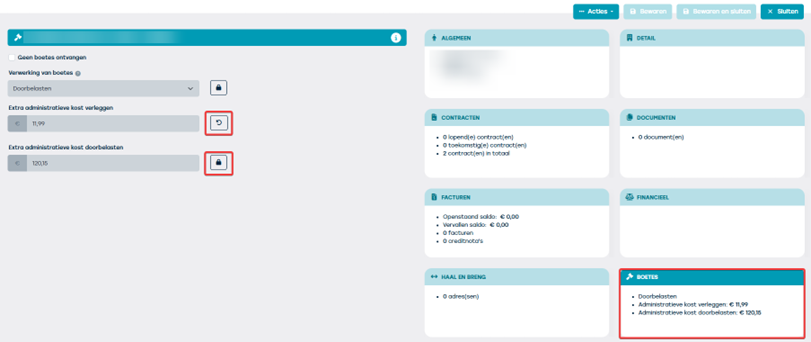
Settings that include a lock are the general settings configured by ProPlanner.
If you wish to deviate from this, you will need to click on the lock, enter a different value and save this setting at the top right of the screen.
If afterwards the general settings are changed by us at your request, then all fields with a lock will also change accordingly. The specific settings at customer level (shown via the arrow) will always be retained.
Note: When the 'redirect' setting is still overridden due to legislation or rules of the authority and the fine must therefore be charged or vice versa, the administrative cost for charging will automatically also be applied.