Necessary requirements to register transactions on a contract:
- the module "Collections" must be enabled (contact us for this via support@jumik.be)
- the necessary rights (rights in the group "Financial - Payments") must be granted ('Management' > 'Users and rights')
Via the tile "Collections" on the contract, you have the possibility to register transactions. Here you can choose to register:
- A payment-related transaction
- A deposit-related transaction
Register payment-related transaction
Via the "Payment" button you can register a payment on the contract. When you click this button, the following dialog will be shown:
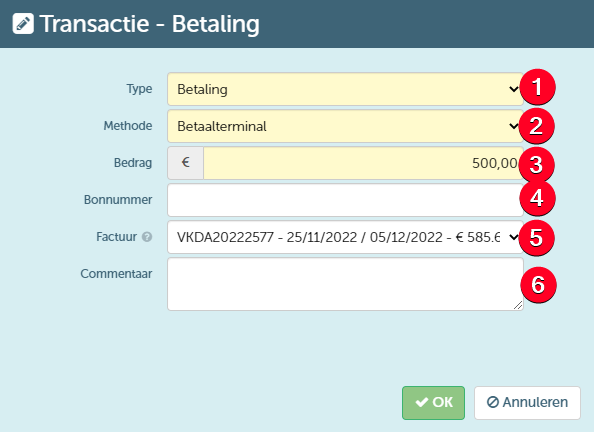
In this window, you can:
- Determine the type of the transaction, for which you can choose from the following options:
- Payment - when it concerns a payment by the customer, you should select this type
- Refund - when it concerns a refund to the customer, you should select this type
- Refund request - this type should be selected to indicate that a refund still needs to be processed. This request will then be shown in the overview of reimbursements from where these can be processed in bulk.
- Request transfer to another contract - this type should be chosen when you wish to transfer the refund amount to a new contract for the same customer (where it can serve as the deposit payment)
- Indicate which method is used to execute the transaction. Depending on the selected type, you will be able to select different options here.
- Enter the amount of the transaction
- The voucher number of the voucher used for the transaction, if any.
- Enter the invoice number of the invoice that is (partly) paid by this transaction. Here you can only select the invoices that were created within the relevant contract. This can only be changed if the relevant transaction has not yet been exported to an accounting package.
- Enter any additional comment.
When you then save this transaction, it will be displayed in the tile "Collections" and the balance will be updated in case it is a payment (see further).
If you wish to use the method "Cash", you must first define at least one cash register at the business unit where the payment is registered. Defining cash registers is done on the management screen for cash registers.
Register deposit-related transaction
Via the "Deposit" button you can register the (partial) payment of the deposit. When you click this button, you will enter the same dialog window as when registering a regular payment. However, the available transaction types you can choose from will be different. When registering a payment of the deposit, the following transaction types are possible:
- Deposit collection - when it concerns an actual payment of the deposit, you should select this type. Here you can choose (via the method) to transfer the deposit from another contract (if a transfer from another contract has already been registered)
- Deposit credit card authorization - use this to register the credit card reservation of the customer for possibly paying the deposit later (if necessary)
- Deposit refund - use this to register a refund of the deposit to the customer at the end of the contract
- Request transfer to another contract - this type should be chosen when you wish to transfer the deposit to a new contract for the same customer (where it can again serve as the deposit payment)
For the option "Deposit collection" an extra option will be displayed allowing you to enter the IBAN number for a possible refund of the deposit. When entering this number, you can also choose to save the IBAN on the main client card on the contract. In doing so, the already entered account number on this client card will be overwritten.
After saving the transaction, it will also be displayed on the tile "Collections" in this case, and the balance of the deposit will be updated (see further).
The option "Deposit refund" is only available if the deposit is not settled on the final invoice. For more information on processing a deposit, you can go here.
Example of the tile "Collections" after registering several transactions
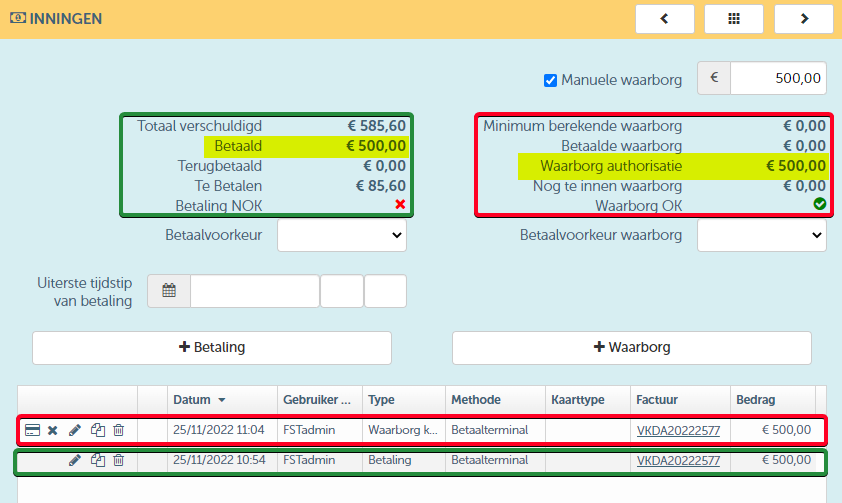
As you can see, this tile also shows the current payment status of both the invoice amount and the deposit.